
Quick answer
The latest Halo Campaign Evolved update includes stability fixes for cinematic playback on AMD GPUs with FSR, GPU driver warnings on PC, mission-specific AI improvements (e.g., Jackals in 'Truth and Reconciliation'), and launch/configuration stability fixes—especially for Steam, Intel CPUs, and Vsync/upscale interactions.
Guide briefing
Halo Campaign Evolved patch notes update changes
The latest Halo Campaign Evolved update includes stability fixes for cinematic playback on AMD GPUs with FSR, GPU driver warnings on PC, mission-specific AI improvements (e.g., Jackals in 'Truth and Reconciliation'), and launch/configuration stability fixes—especially for Steam, Intel CPUs, and Vsync/upscale interactions.
Applies to
- — Players launching Halo Campaign Evolved on PC with AMD or Nvidia GPUs
- — Users experiencing crashes during 'The Maw' cinematic or mission progression
- — Those using high-refresh displays or upscaling technologies like DLSS/FSR/XeSS
- — Players with large friends lists on Windows PC, Steam, or PlayStation
- — Users with Intel 13th/14th gen CPUs or custom key bindings
Halo Campaign Evolved patch notes update changes
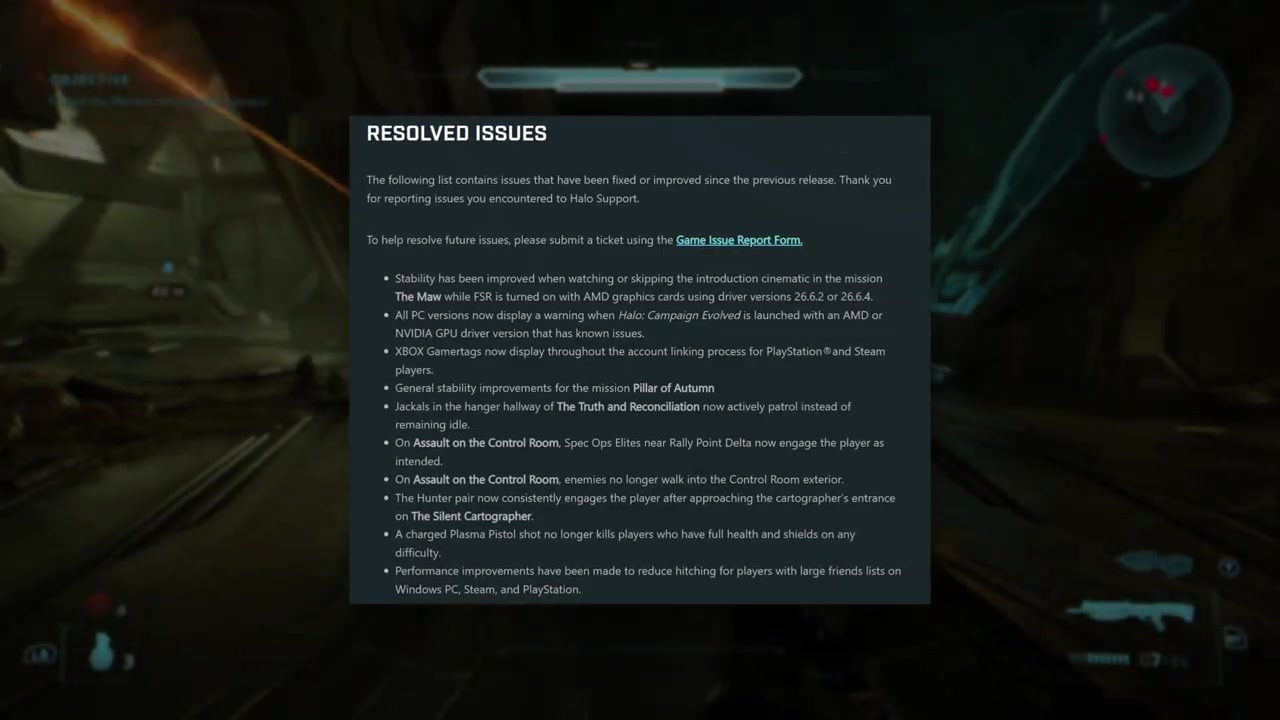
The latest update to Halo Campaign Evolved includes a suite of fixes and improvements focused on stability, visual fidelity, AI behavior, and compatibility. The update size varies by platform: 13 GB on Xbox, 7 GB on PlayStation, 21 GB on Steam, and 4 GB on the Xbox app. Key changes address specific issues reported since the previous release, with emphasis on cinematic playback, GPU driver warnings, account linking, mission stability, enemy AI, and weapon behavior.
How it works
- Stability improvements for the introduction cinematic in 'The Maw' when FSR is enabled on AMD GPUs prevent crashes or stuttering during playback.
- A warning message now appears at launch on PC if the installed GPU driver (AMD or Nvidia) is known to cause issues with Halo Campaign Evolved.
Source boundary: The GPU driver warning only applies to PC versions; console players are unaffected. The fix for the plasma pistol’s overkill behavior does not extend to other weapons or damage types, and the Jackal patrol change is limited to the 'Truth and Reconciliation' mission.
Halo Campaign Evolved patch notes update changes
The patch includes targeted optimizations and known issue disclosures for specific platforms, focusing on performance stability and cinematic playback fidelity. Key adjustments address hitching related to large friends lists on Windows PC, Steam, and PlayStation, while also documenting ongoing workarounds for persistent visual and audio issues during cutscenes.
How it works
- Reduced hitching for players with large friends lists on Windows PC, Steam, and PlayStation through backend optimization of friend list synchronization.
- Cinematic stuttering due to non-even refresh rates (e.g., 59Hz) is mitigated by recommending display settings at multiples of 30Hz—such as 60, 120, or 240Hz—or enabling TV Game Mode and disabling Variable Refresh Rate.
Source boundary: Cinematic stuttering remains possible if display refresh rate is not a multiple of 30Hz, even with recommended settings. Audio-video desync and brief freezing can still occur when pausing/resuming during cinematics. Navigation markers require full fire team progression, and banshee destruction prevents generator progress in 'Betrayals' post-first generator. Audio popping may persist during 'Truth and Reconciliation'.
Launch Method and Configuration Stability Issues
The Halo Campaign Evolved patch introduces several launch-related issues tied to how the game is initiated and how user configurations are preserved. These include Steam connectivity failures when launching directly from the executable, unexpected reset of custom key bindings, hardware-specific crashes on newer Intel processors, and GPU-related instability with high-refresh displays and Vsync.
How it works
- Launching Halo Campaign Evolved.exe directly from the Steam installation folder bypasses Steam's launcher, causing the game to run without Steam authentication or services, leading to sign-in failure, performance degradation, or hard freezes requiring task manager intervention.
- Custom key binding resets occur when users overwrite existing bindings; the workaround requires first assigning a new key to an unused function before remapping the desired action, preserving the original configuration.
Source boundary: The BIOS update fix only applies to systems where the Intel microcode issue is present and the game fails before the splash screen. The key binding workaround does not prevent resets if the user overwrites an active binding directly. Vsync-related crashes are limited to AMD GPUs under specific refresh rate and frame rate conditions.
Frame Rate Limiting and Upscaling Compatibility Issues
The Halo Campaign Evolved patch introduces several known issues related to frame rate management and upscaling technologies, particularly when combining in-game frame limits with Vsync, DLSS, FSR, or XeSS. These interactions can lead to visual freezing, graphical artifacts, or crashes depending on hardware and driver configurations.
How it works
- When Vsync is enabled, the game must match a minimum frame rate—specifically, at least one-quarter of the display's refresh rate (e.g., 45 FPS for a 180 Hz monitor) to avoid stuttering or screen tearing.
- Using XeSS with frame generation while an in-game maximum frame rate limit is active can cause the game to appear visually frozen, updating only occasionally, due to conflicting timing between the upscaler and the frame limiter.
Source boundary: The current workaround requires manual adjustment of frame rate limits, disabling Vsync, or switching upscaling methods. There is no automatic mitigation built into the game, and some combinations (like XeSS + frame generation + frame limit) remain incompatible without user intervention.